4
Rounds of usability testing across lo-fi and hi-fi
Mobile App
Responsive Website
E-Commerce
End-to-End UX
My role
Duration
Tools
Platforms

Gamers, developers, and everyday consumers often search across several websites and apps to find, compare, and purchase software and gaming equipment. Foundational research conducted during the website phase showed that users visited 3–8 different platforms and spent anywhere from 30 minutes to several hours comparing products, prices, and purchasing options. This fragmented experience made it difficult to compare information, created uncertainty around hidden fees and shipping costs, and forced users to adapt to different navigation and checkout experiences.
Platforms visited before a single purchase
Distinct user types served across both platforms
Platforms designed - iOS app and responsive website
A foundational research survey was conducted with 7 participants across the United States, Europe, and Asia to understand how people discover, compare, and purchase software and gaming equipment. A competitive audit of 4 major platforms was also completed to identify common patterns, usability gaps, and opportunities for a more unified experience.
1
Users felt overwhelmed by the number of platforms and choices available. Participants reported visiting 3–8 platforms and spending 30 minutes to several hours comparing products, prices, and purchasing options before making a decision.
2
Hidden fees and shipping costs were often revealed only at checkout, making users feel misled by the final price. Participants wanted to understand the complete cost earlier in the purchasing process so they could compare products and make confident decisions.
3
Navigation, checkout flows, and mobile experiences varied across platforms, making it harder for users to understand where they were and what to do next. Participants wanted a more consistent experience across devices so they could move between discovery, comparison, and purchase with less friction.
— Survey participant, foundational research survey with 7 participants
I audited four competitors across physical retail, digital marketplaces, gaming platforms, and software stores. The comparison revealed opportunities to combine broad product discovery, transparent pricing, consistent navigation, and flexible purchasing options in one experience.
Physical stores + online platform, broad gaming inventory
No software design tools, limited accessibility options
Strong brand, digital purchases, game upgrades online
Difficult signup, limited to PlayStation ecosystem only
Wide product range, physical locations, computer services
Too broad; unfocused for tech/gaming users
Instant digital download, large software library
Expensive subscriptions, complex bundle selection
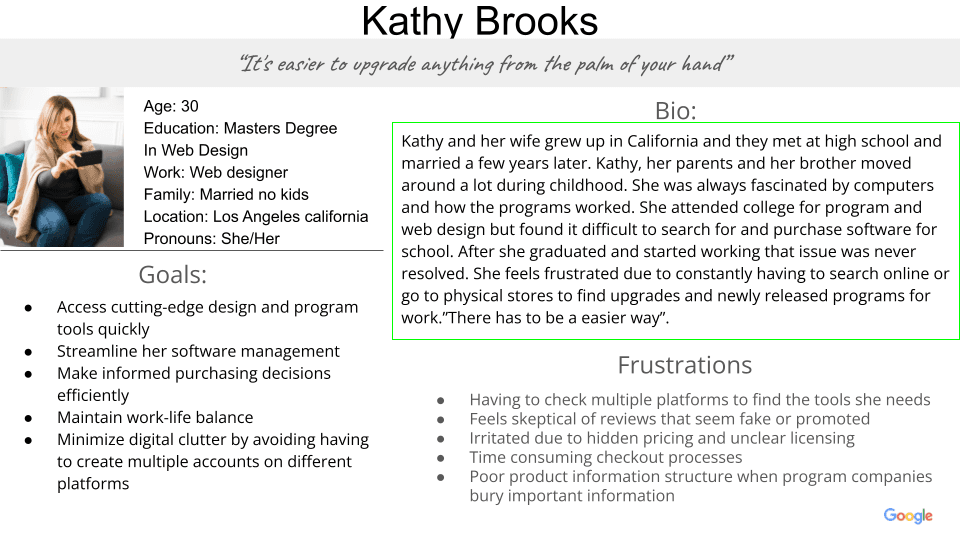
Four personas were developed across the iOS app and responsive website to represent different shopping goals, constraints, and decision-making behaviors. Together, they helped guide design decisions for discovery, product comparison, checkout, delivery, and store pickup, ranging from the time-pressed professional to the budget-conscious student gamer.


Each user interacts with the product differently. What they do, how they feel, and what frustrates them throughout their journey reveals the real story. This journey map follows Marcus, a budget-conscious student gamer, as he searches for and evaluates a product.

The research revealed that information overload and inconsistent navigation were central problems, not just checkout issues. I translated these findings into the sitemap and information architecture, organizing the experience so users could discover products, compare options, and move toward purchase with less cognitive effort.
1
Navigation was structured around the main tasks users needed to complete: discovering products, comparing options, managing saved items, and completing a purchase. The iOS app included Home, New Releases, Coming Soon, Search, Map, Profile, and Favorites, with accessibility settings built into the experience from the start.
2
I explored multiple paper-wireframe directions to determine how users could discover products, compare options, and move toward checkout with minimal friction. The strongest patterns from each iteration were carried forward into the digital structure for both the iOS app and responsive website.
3
I translated the strongest paper-wireframe patterns into digital screens for the iOS app and responsive website. The designs focused on clear product information, easier comparison, a more direct path to checkout, and flexible delivery or store-pickup options.


Both platforms were evaluated through four rounds of remote, unmoderated usability testing: two rounds for the iOS app and two rounds for the responsive website. Testing covered lo-fi and hi-fi prototypes, with each session designed to take approximately 10–15 minutes. Participants completed remote sessions online.
In the first testing round, participants were unsure what several navigation icons represented without labels. This made it harder to understand where each section would lead and increased hesitation during navigation.
After navigating to another section, participants were unsure how to return to Home. The absence of a persistent Home option made the experience feel less predictable and added friction to basic navigation.
Participants found the navigation menu difficult to scan because it contained too many options. Several users questioned the need for separate destinations, suggesting that the structure could be simplified around the most important shopping tasks.
Participants encountered several confirmation screens during checkout, which made the purchase flow feel longer than necessary. The repeated steps interrupted progress and created uncertainty about whether the purchase was moving forward.
In the hi-fi round, 4 of 5 participants said the amount of content made it harder to complete primary actions. The dense layout competed with key actions and made the next step less obvious.
In the hi-fi round, 4 of 5 participants had difficulty locating or recognizing key buttons. Inconsistent placement, size, and visual emphasis made the primary actions less noticeable.
Although all 5 participants completed the navigation tasks, some still hesitated when choosing where to go next. This showed that the revised structure was easier to use, but labels and visual hierarchy could be refined further to make key paths more immediate.
Participants responded positively to the favorites-based purchase flow, describing it as easy to use and helpful for quickly buying preferred items.
"It was easy to complete a purchase from my favorites list."
— Participant D
During the first website testing round, participants found the filter animation distracting and inconsistent. The transition made it harder to understand when the results had updated and reduced confidence in the interaction.
During the first website testing round, participants had difficulty understanding the difference between shipping and pickup. The options were not distinct enough, which made the choice feel uncertain.
Participants were unsure whether they had progressed through checkout or completed the purchase. The lack of clear feedback made the flow feel uncertain and reduced confidence in what to do next.
Participants had difficulty finding the right sorting option and needed more scrolling than expected to locate key actions. This made product discovery feel slower and less efficient.
In the hi-fi round, participants needed stronger visual hierarchy around primary calls to action. The crowded layout slowed decision-making and made the most important actions harder to identify.
Primary buttons needed stronger visual emphasis and clearer placement above the fold so participants could identify the main action more quickly.
Before building the hi-fi screens, I established a shared design system for the iOS app and responsive website. The system defined typography, color, spacing, buttons, and reusable components, helping keep the experience consistent while allowing each platform to follow its own interaction patterns.

The highest-priority usability findings guided the final design iteration, including navigation simplification, stronger action hierarchy, and an expanded pickup flow.
1
I consolidated redundant menu items, reducing the menu from 7 to 6 destinations. This directly addressed participants’ concerns about an overwhelming menu and made the navigation easier to scan.
2
I added a persistent Home icon to the bottom navigation so users could return to Home from anywhere in the app. This directly addressed the Round 1 navigation finding and made the experience more predictable.
3
I placed the Buy Now button directly below the product image and increased its size to make the primary action easier to find and use.
4
I expanded the pickup flow to include store search, driving, transit, and walking directions, along with rideshare options. This gave users more flexibility when planning how to collect their purchases and created a point of differentiation from competitors.


Tap through the full iOS app; home, product detail, cart & checkout
View app prototype →
Click through the full website desktop version
View website prototype →
Voice-enabled search and navigation help users complete tasks with less friction and provide a more accessible way to interact with the product.
Clear typographic hierarchy helps users distinguish sections, prioritize information, and scan the interface more efficiently.
Reduced visual stimulation supports users who are sensitive to brightness and provides a more comfortable experience across different lighting conditions.
Programers went from a blank brief to two fully tested hi-fi prototypes. One iOS app and one responsive website across 4 rounds of usability testing with 4 distinct personas.
Platforms designed and delivered end-to-end
Rounds of usability testing across lo-fi and hi-fi
Usability themes identified across four studies
Combined average navigation rating from lo-fi to hi-fi testing
When I started the Programers app, I moved directly into design without conducting foundational research. I did not yet understand how important that step was. When I later began designing the website, I conducted user research and saw how it could ground design decisions in real user needs. In retrospect, starting with research across both platforms would have created a stronger foundation for the entire product.
Not every user buys in the same way. The usability studies showed that delivery preferences, pickup options, and pricing shaped how each persona completed a purchase. Designing for four distinct personas made that impossible to ignore. A strong product experience must work for the user in front of you, not just for an average user.